

Choosing the right recorder is as important as choosing the right CCTV camera. An NVR is generally the better fit for new IP-camera installations, while a DVR or XVR makes more sense when a site already has coaxial analog cameras. The correct choice depends on camera type, channel count, resolution, storage retention, network bandwidth, PoE requirements, AI features, and future expansion.
Key Takeaways
Choose an NVR for IP CCTV cameras because video is transmitted over a network and the system is easier to scale across modern installations.
Choose a DVR/XVR for existing coaxial cameras when replacing the entire camera cabling infrastructure is unnecessary.
Do not select an NVR only by channel count; incoming bandwidth, decoding capacity, recording resolution and storage support also need to match the cameras.
Calculate storage from bitrate and retention days, not resolution alone. Compression, frame rate and recording mode materially affect HDD requirements.
For Indian business installations, check compliance requirements and verify applicable CCTV security requirements before procurement. STQC's IoT certification framework covers CCTV cameras under the notified Essential Requirements for Security of CCTV.
NVR vs DVR: Which One Should You Choose?
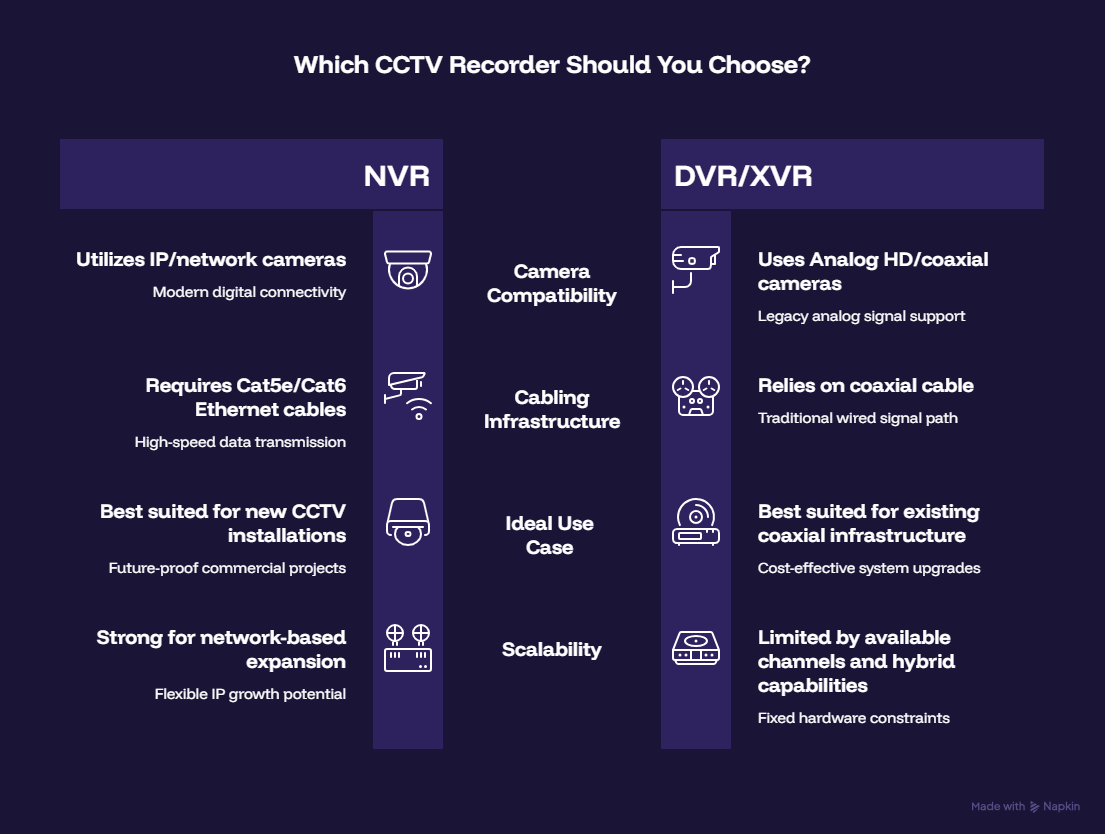
Choose an NVR for a new IP surveillance system and a DVR/XVR when you need to retain compatible analog infrastructure. NVRs record network video streams from IP cameras, whereas DVRs traditionally record video received through coaxial connections from analog cameras.
For example, a new 16-camera office installation using 4MP or 8MP IP cameras would normally be designed around a 16-channel NVR and PoE/network infrastructure. A factory that already has 16 working coaxial cameras may find an XVR more practical if the objective is to upgrade recording without immediately replacing every camera and cable.
Requirement | NVR | DVR/XVR |
Camera type | IP/network cameras | Analog HD/coaxial cameras; XVR may support multiple formats |
Transmission | Ethernet/network | Coaxial cable |
Typical deployment | New installations, offices, warehouses, campuses | Existing analog infrastructure |
PoE | Available on selected NVRs | Usually requires separate network infrastructure for IP cameras |
Scalability | Strong for network-based expansion | Depends on supported inputs and hybrid capability |
AI integration | Camera-side or NVR-side analytics | Depends heavily on recorder/model |
Best starting point | New CCTV project | Existing coaxial CCTV project |
What NVR Channel Count Do You Need?
Select an NVR with enough channels for the current cameras plus realistic future expansion. A 16-camera requirement does not always mean a 16-channel recorder is the best purchase; adding spare capacity can avoid replacing the recorder when the site expands.
A practical approach is:
Required channels = current cameras + planned expansion + operational reserve.
For 12 cameras today with four more likely within the next year, a 16-channel NVR is a logical starting point. For a 16-camera warehouse where additional loading-bay, perimeter or gate cameras are likely, moving to a 32-channel platform may be more appropriate.
HiFocus currently lists NVRs across 8, 10, 16, 32, 40, 64, 80 and 160 channels, with model-dependent storage configurations and recording support up to 4K/8MP per channel.
For large deployments, channel count should also be checked against incoming bandwidth and decoding capacity. For example, one HiFocus 80-channel-class recorder specification lists up to 400 Mbps incoming bandwidth and model-dependent decoding capabilities, illustrating why channel count alone is not enough for recorder selection.
How Much Storage Does a CCTV NVR Need?
CCTV storage should be calculated from camera bitrate, recording hours, number of cameras, and required retention period. Resolution matters, but bitrate is the more useful number for estimating actual storage consumption.
A simplified calculation is:
Storage ≈ Total bitrate × recording time × number of days
For example, assume:
16 cameras
Average bitrate: 4 Mbps per camera
24-hour continuous recording
30-day retention
The approximate data requirement is:
4 Mbps × 16 × 86,400 × 30 ÷ 8 ≈ 20.7 TB
Actual requirements can differ because of variable bitrate, scene complexity, frame rate, motion recording and compression settings. Axis' storage guidance similarly demonstrates that bitrate and retention time are key capacity variables, with different bitrates producing substantially different daily storage consumption even at comparable camera resolutions.
Therefore, do not buy a recorder first and calculate storage afterward. Establish the retention requirement, camera bitrate and recording mode during system design.
Should You Choose 2MP, 4MP, 6MP or 8MP Cameras?
Choose resolution according to the identification task and viewing distance, not simply the highest available megapixel count. A higher-resolution camera can capture more detail, but it also increases bandwidth, decoding and storage requirements.
For example:
Camera resolution | Suitable use | Recorder consideration |
2MP / 1080p | General indoor monitoring | Lower storage and bandwidth |
4MP | Offices, retail, warehouses | Good balance for many business deployments |
6MP | Wider areas requiring additional detail | Higher bitrate/storage |
8MP / 4K | Critical entrances, large areas, detailed identification | Higher bandwidth, storage and decoding demand |
A camera with an 8MP sensor connected to a recorder that cannot adequately record, decode or store its stream creates an avoidable bottleneck. The camera, network, NVR and storage system should therefore be specified as one architecture.
For more guidance on selecting cameras around the application rather than specifications alone, HiFocus's CCTV Camera Buying Guide for Businesses in India provides a broader selection framework.
Do You Need PoE in an NVR?
PoE is useful when IP cameras need both network connectivity and power through Ethernet cabling. A PoE NVR can simplify smaller installations because compatible cameras can connect directly to the recorder's PoE ports.
However, PoE ports are not the only consideration. Check the recorder's total PoE power budget, per-port power capability, cable distances and switch architecture.
A typical commercial installation may use Cat6 cabling from cameras to a PoE switch and then uplink that switch to the NVR. For longer runs or larger campuses, network architecture becomes more important than simply choosing an NVR with built-in PoE.
HiFocus's blog on PoE Budgeting for CCTV Networks: How to Avoid Power Failures explains why power planning matters when multiple cameras operate simultaneously.
What NVR Features Matter for Business CCTV?
The most important NVR features are recording bandwidth, storage expansion, decoding capacity, compression, remote access, compatibility and the AI functions required by the site.
For a business installation, check:
Incoming and outgoing network bandwidth
Maximum recording resolution per channel
Maximum decoding capability
H.265/H.265+ support
Number and capacity of SATA bays
RAID support where required
Camera compatibility and ONVIF support
PoE ports and total PoE budget
Remote viewing and user-access controls
Camera-side and NVR-side AI analytics
Alarm inputs/outputs where required
Backup and export options
Modern AI NVRs can also perform functions such as person/vehicle detection, perimeter intrusion, face-related analytics and smart search, depending on the recorder and connected cameras. HiFocus's current NVR range includes models with camera-side and NVR-side analytics, including higher-capacity configurations for large deployments.
If cybersecurity is part of the procurement requirement, it should be considered at the camera, firmware, network and recorder levels rather than treated as an optional feature. HiFocus's HIT Technology cybersecurity framework for CCTV
discusses device integrity, secure boot, firmware validation and authenticated communication as layers of surveillance security.
Does STQC Certification Matter When Choosing a CCTV System in India?
Yes, applicable CCTV security and procurement requirements should be checked before purchasing network-connected surveillance equipment in India. STQC, under MeitY, operates the IoT System Certification Scheme and its CCTV certification process evaluates cameras against the notified Essential Requirements for Security of CCTV.
The official STQC framework is specific: its certified-product documentation covers CCTV cameras, while the notified requirements address areas including hardware, software/firmware and secure development processes.
STQC's current product-series guidance also requires attention to details such as SoC information, firmware versions and hashes, software bill of materials and security-related hardware consistency within a product series.
For businesses, government projects and institutional procurement, do not rely solely on a manufacturer's statement. Verify the applicable certification or compliance documentation for the specific products being proposed.
HiFocus currently states that it has 30 STQC-approved IP camera SKUs, covering product families such as fixed bullet, fixed dome and motorized-varifocal cameras.
When Should You Consider VMS Instead of an NVR?
A VMS becomes worth considering when surveillance grows beyond a straightforward recorder-based installation, especially across multiple locations or large camera counts.
An NVR is usually simpler for a single-site deployment, while VMS can provide centralized management and broader scalability.
For example, a 16-camera retail outlet may be perfectly suited to an NVR. A company managing 200 cameras across offices in five cities may benefit from a VMS architecture that centralizes monitoring, permissions, event management and video operations.
HiFocus's recent VMS vs NVR guide for large business surveillance explains this architectural decision in greater detail.
A Practical NVR/DVR Selection Checklist
Before approving a recorder, confirm:
Camera technology: IP, analog HD or hybrid
Current and future camera count
Maximum camera resolution
Total incoming bitrate
Recording resolution and frame rate
Continuous vs motion/event recording
Required retention period
HDD capacity and number of SATA bays
PoE requirement and power budget
AI analytics required
Remote-access requirements
Backup/export requirements
Applicable STQC/BIS/security requirements
Expansion plans for the next 2–3 years
Why HiFocus for an Indian CCTV Deployment?
HiFocus is a Chennai-based Indian CCTV brand serving business and institutional surveillance requirements nationwide, with IP cameras, NVRs, DVR/XVR systems and AI-enabled surveillance solutions. Its current portfolio includes 30 STQC-approved IP camera SKUs, while its NVR range extends from smaller installations to 160-channel configurations, allowing system architecture to be matched to the size and requirements of a site.
For a new IP installation, HiFocus can be considered when the requirement includes camera selection, recorder sizing, storage planning and AI-enabled surveillance as part of one system design.
Need help specifying the right recorder for your site? Consult the HiFocus team for a CCTV configuration based on your camera count, retention period, resolution and application requirements.
Conclusion
The right NVR or DVR is determined by the complete CCTV architecture, not by channel count or price alone. For new IP-camera installations, an appropriately sized NVR is generally the practical choice; for existing coaxial systems, a DVR/XVR can provide a more efficient upgrade path.
Before purchasing, calculate camera bandwidth and storage, confirm resolution and decoding compatibility, assess PoE requirements, plan for future expansion, and verify applicable Indian security and certification requirements. A correctly specified recorder protects the usefulness of the cameras you have already invested in and makes future expansion far easier.
Frequently Asked Questions
Is NVR better than DVR for CCTV?
NVR is generally better for new IP-camera installations, while DVR is more suitable for existing analog/coaxial systems. The right choice depends on the camera infrastructure, expansion plans and required features rather than one recorder being universally better.
How many cameras can a 16-channel NVR support?
A 16-channel NVR can normally record up to 16 compatible camera streams. However, you must also check its incoming bandwidth, recording-resolution limits, decoding capability and storage capacity before connecting 16 high-resolution cameras.
How much HDD storage is required for 16 CCTV cameras?
There is no single HDD size for 16 cameras because storage depends on bitrate, resolution, frame rate, compression, recording mode and retention period. For accurate planning, calculate storage from the total bitrate and number of retention days rather than camera count alone.
Can an NVR work with any IP camera?
Not necessarily. Check protocol compatibility, ONVIF support, supported codecs, resolution, bitrate, audio/alarms and the specific AI features you require before mixing cameras and recorders from different manufacturers.
Is PoE NVR better than a normal NVR?
A PoE NVR can simplify smaller IP-camera installations because compatible cameras can receive power and network connectivity through Ethernet. For larger deployments, a dedicated PoE switch may provide more flexibility for network design, redundancy and expansion.
Do I need 4K NVR for 4K CCTV cameras?
A 4K camera should be paired with a recorder that supports its required recording resolution and bitrate. Buying an 8MP/4K camera without checking the NVR's recording and decoding specifications can create a system bottleneck.
Does STQC certification apply to CCTV cameras in India?
STQC's IoT System Certification Scheme covers CCTV cameras and evaluates them against the notified Essential Requirements for Security of CCTV. Buyers should verify the applicable certification and procurement requirements for the specific camera models being considered.
What is better for a large business: NVR or VMS?
An NVR is often sufficient for a straightforward single-site deployment, while VMS becomes more useful as camera counts, sites, users and management requirements increase. The decision should be based on the required surveillance architecture rather than camera count alone.